
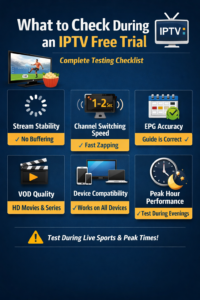
✅ What to Check During an IPTV Free Trial (Complete Testing Checklist)
An IPTV free trial is your best opportunity to evaluate an IPTV service before paying for a subscription 💡. Many users make the mistake of activating a trial, watching for a few minutes, and deciding too quickly — which often leads to disappointment later.
To make the most of your trial, you need to test the right things, at the right time, on the right device. This guide explains what to check during an IPTV free trial, so you can confidently choose (or reject) a service based on real performance.
🤔 Why Testing an IPTV Free Trial Properly Matters
Not all IPTV services perform the same under real-world conditions. Some work well during off-peak hours but fail when demand is high.
A proper IPTV free trial test helps you evaluate:
-
📡 Stream stability
-
⚡ Speed & responsiveness
-
📺 Channel availability
-
📅 TV guide accuracy
-
🎬 Video-on-Demand quality
👉 Skipping these checks often leads to buffering, freezing, or poor reliability after purchase.
📺 1. Channel Availability & Variety
The first thing to check during an IPTV free trial is channel coverage. Make sure first to used the best applications for free trial to ensure everything works well
What to look for:
-
✅ Local & international channels
-
✅ Sports, movies, news, kids, entertainment
-
✅ Premium and HD/4K channels (if advertised)
Pro tip 💡
Scroll through multiple categories — not just the first few channels. Some services show strong listings but lack depth.
⚡ 2. Channel Switching Speed (Zapping Time)
Channel switching speed is one of the most important quality indicators of an IPTV service.
Test this by:
-
Rapidly switching between 5–10 channels
-
Trying HD and sports channels
-
Switching during peak hours ⏰
What’s good?
-
🔥 1–2 seconds = excellent
-
⚠️ 4–5 seconds = average
-
❌ Longer = poor server performance
Slow zapping usually means overloaded servers.
📡 3. Buffering & Stream Stability
Buffering is the #1 reason users abandon IPTV services.
Test buffering by:
-
Watching channels continuously for 15–30 minutes
-
Testing during evenings or live sports 🏟️
-
Switching between HD and SD streams
Important:
Occasional buffering can be normal, but frequent freezing is a red flag 🚩.
📅 4. EPG (Electronic Program Guide) Accuracy
The EPG tells you what’s currently playing and what’s coming next.
Check:
-
📅 Correct channel names
-
⏰ Accurate program timings
-
🔄 Regular updates
A poor EPG often indicates low-maintenance IPTV services.
🎬 5. VOD (Movies & Series) Quality
If the IPTV free trial includes VOD, test it carefully.
What to check:
-
🎥 Video quality (HD / Full HD)
-
🔊 Audio sync
-
⏩ Fast forward & rewind
-
🖼️ Subtitle availability
Tip:
Test both new and older titles — some services prioritize only recent content.
🔊 6. Audio & Subtitle Performance
Many users overlook this, but it’s important.
Test:
-
🔊 Clear audio without delays
-
🎧 Volume consistency across channels
-
📝 Subtitle sync on movies and series
Poor audio sync can ruin the viewing experience, even if video quality is good.
📱 7. App Compatibility & Performance
Your IPTV free trial should work smoothly on your main device.
Test on:
-
📱 Mobile phone (Android / iOS)
-
💻 PC or laptop (optional)
What to look for:
-
App crashes ❌
-
Slow loading ⚠️
-
Smooth navigation ✅
👉 Always test using at least one premium IPTV app, not just a basic player.
🌐 8. Internet Speed & Network Performance
Even the best IPTV service needs a stable internet connection.
Recommended speeds:
-
📺 HD streaming: 10 Mbps+
-
🎬 4K streaming: 25 Mbps+
Test on:
-
Wi-Fi
-
Ethernet (if available)
If buffering disappears on Ethernet, the issue may be your Wi-Fi, not the IPTV service.
⏰ 9. Peak Hour Performance (Very Important)
Many IPTV services perform well during low traffic times but fail when demand is high.
Always test during:
-
Evening hours 🌙
-
Live sports events 🏆
-
Weekends 📆
This reveals the true server capacity of the IPTV provider.
🔐 10. Login Stability & Device Restrictions
Some IPTV free trials have limitations.
Check:
-
🔑 Does the login stay active?
-
📱 Can it be used on more than one device?
-
🔄 Does the session disconnect frequently?
Unexpected logouts can signal strict or unstable systems.
❗ 11. Error Messages & Downtime
During your IPTV free trial, pay attention to:
-
❌ “Stream unavailable” errors
-
⚠️ Channels failing to load
-
🔄 Frequent playlist refresh needs
Occasional errors are normal, but repeated issues indicate poor infrastructure.
🧠 12. Customer Support Response (Often Ignored)
Even during a free trial, support quality matters.
Test:
-
💬 Response time
-
📩 Clarity of answers
-
🛠️ Willingness to help troubleshoot
Good IPTV services usually offer help even during trials. For example with TenetStreams iptv which has support on telegram, jivochat and emails
🚫 Common Mistakes to Avoid During an IPTV Free Trial
Avoid these common errors ❌:
-
Testing for only 5–10 minutes
-
Testing during off-peak hours only
-
Using low-quality IPTV apps
-
Testing only on mobile devices
-
Ignoring buffering because “it’s a trial”
A trial reflects the real paid experience.
🧪 Quick IPTV Free Trial Testing Checklist
Use this simple checklist ✔️:
-
📺 Channels load quickly
-
⚡ Fast channel switching
-
📡 Minimal buffering
-
📅 Accurate EPG
-
🎬 Smooth VOD playback
-
📱 Works well on main device
-
⏰ Performs well during peak hours
If most boxes are checked, the service is worth considering 👍.
🏁 Final Thoughts
Knowing what to check during an IPTV free trial helps you avoid unreliable services and choose one that delivers consistent performance over time. A proper trial test isn’t about watching one channel — it’s about stress-testing the service under real conditions. Make sure to do research on the best iptv services that offer free trials also to reduce the hassle.
Before subscribing, always use your IPTV free trial wisely, test across devices, and evaluate performance during peak hours. A few hours of careful testing can save you months of frustration.
❓ Frequently Asked Questions: What to Check During an IPTV Free Trial
🤔 What is the most important thing to check during an IPTV free trial?
The most important thing to check during an IPTV free trial is stream stability during peak hours. Test live TV and sports in the evening to see if the service buffers, freezes, or disconnects when demand is high.
📡 Why does IPTV work fine during a free trial but buffer later?
IPTV may work smoothly during short tests but buffer later due to:
-
Overloaded servers
-
Poor peak-hour capacity
-
Limited trial users vs paid users
Testing during busy hours reveals these issues early.
⚡ What is a good channel switching speed for IPTV?
A good IPTV service should switch channels within 1–2 seconds. Slower switching usually indicates overloaded or poorly optimized servers.
🎬 Is VOD quality important during an IPTV free trial?
Yes. VOD quality reflects server storage and bandwidth. Check:
-
Video resolution
-
Audio sync
-
Playback controls
Poor VOD performance often means long-term issues.
🌐 What internet speed is required for IPTV free trials?
Recommended speeds:
-
HD streaming: 10 Mbps or higher
-
4K streaming: 25 Mbps or higher
Stable connections matter more than raw speed.
🔐 Why does my IPTV free trial stop working suddenly?
An IPTV free trial may stop working if:
-
The trial period expired
-
Multiple devices were used
-
Login limits were exceeded
-
Credentials were entered incorrectly