
📱 Best Apps to Test IPTV Free Trials (Top IPTV Players in 2025)
Testing an IPTV free trial properly depends heavily on which app you use. Even the best IPTV service can look bad if you test it on the wrong player, while a good IPTV app can reveal the true quality of a trial.
In this guide, we’ll cover the best apps to test IPTV free trials across Firestick, Android TV, Smart TVs, mobile devices, and PC — so you can accurately judge streaming quality, stability, and features before paying.
🤔 Why Choosing the Right IPTV App Matters
Not all IPTV apps perform the same. The app you choose affects:
-
⚡ Channel switching speed
-
📡 Buffering and stream stability
-
📅 EPG (TV guide) accuracy
-
🎬 VOD playback quality
-
🎛️ Customization and settings
👉 To get real results, always test your IPTV free trial using at least one high-quality IPTV player.
🔑 What to Look for in an IPTV App for Free Trials
Before we jump into the list, here’s what makes an IPTV app good for testing:
-
✅ Supports M3U playlists & Xtream Codes
-
✅ Fast and stable playback
-
✅ Works well during peak hours
-
✅ Easy to install and configure
-
✅ Compatible with your main device
🏆 Best Apps to Test IPTV Free Trials
Below are the top IPTV apps that professionals and experienced users rely on when testing IPTV trials.
🔥 1. TiviMate (Best Overall IPTV Player)

Best for: Firestick & Android TV
TiviMate is widely considered the best IPTV app for testing free trials, especially on Firestick and Android TV. This application works very well with TenetStreams IPTV and their free trials
⭐ Why TiviMate is excellent:
-
Ultra-fast channel switching ⚡
-
Clean, TV-like interface 📺
-
Advanced EPG support 📅
-
Playlist refresh & catch-up support
-
Handles large channel lists smoothly
⚠️ Notes:
-
Premium version unlocks advanced features
-
Still works well for trial testing without premium
👉 If an IPTV free trial performs well on TiviMate, it’s usually a strong service.
📲 2. IPTV Smarters Pro (Most Beginner-Friendly)
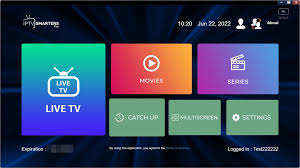
Best for: Firestick, Android, iOS, Windows
IPTV Smarters Pro is one of the most popular IPTV apps and is perfect for users testing IPTV trials for the first time.
⭐ Key features:
-
Easy Xtream Codes login 🔐
-
Works on almost all devices
-
Built-in VOD player 🎥
-
Simple interface for quick setup
👍 Why use it for trials:
-
Quick setup means faster testing
-
Great for checking basic performance
-
Ideal for multi-device testing
🧠 3. Perfect Player IPTV (Lightweight & Fast)
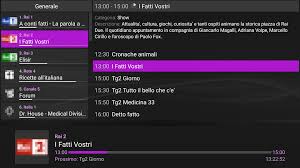
Best for: Android TV & Android phones
Perfect Player is a lightweight IPTV app that focuses on speed and stability.
⭐ Highlights:
-
Fast loading times 🚀
-
Excellent playlist management
-
EPG customization options
-
Minimal system resource usage
👍 Best use case:
-
Testing IPTV free trials on lower-end devices
-
Identifying buffering caused by the service, not the app
📺 4. Smart IPTV (Best for Smart TVs)
Best for: Samsung & LG Smart TVs
Smart IPTV is a common choice for testing IPTV trials directly on Smart TVs.
⭐ Features:
-
Designed specifically for TVs
-
Stable playback for live channels
-
External playlist upload system
⚠️ Important:
-
Requires a one-time activation fee
-
Limited customization compared to Android apps
👉 Good for checking how an IPTV free trial performs without external devices.
🍏 5. GSE Smart IPTV (Best for iOS Users)
Best for: iPhone & iPad
GSE Smart IPTV is one of the best IPTV apps available on iOS, making it ideal for mobile trial testing.
⭐ Why it stands out:
-
Supports M3U & Xtream Codes
-
Clean interface for mobile screens
-
Built-in EPG and VOD support
-
Chromecast compatibility 📡
👍 Best for:
-
Testing channel lists
-
Browsing VOD libraries
-
Quick performance checks
💻 6. VLC Media Player (Best for PC Testing)

Best for: Windows, Mac, Linux
VLC isn’t a traditional IPTV app, but it’s surprisingly useful for testing IPTV free trials.
⭐ Why VLC is helpful:
-
Plays M3U streams easily
-
No installation restrictions
-
Helps diagnose stream issues
-
Great for quick tests on desktop
⚠️ Limitations:
-
No advanced IPTV features
-
Not ideal for long-term viewing
👉 Perfect for technical testing and troubleshooting.
🔄 Should You Test IPTV Free Trials on Multiple Apps?
Yes — and this is very important ❗
Testing on multiple IPTV apps helps you determine:
-
If buffering is app-related or service-related
-
Whether the IPTV provider supports different players
-
How flexible the service is across devices
🧪 Recommended testing combo:
-
TiviMate (main device)
-
IPTV Smarters (backup app)
-
Mobile app (quick checks)
❗ Common Mistakes When Testing IPTV Free Trials
Avoid these mistakes when choosing an IPTV app:
-
❌ Testing only on one app
-
❌ Using outdated IPTV players
-
❌ Judging performance during off-peak hours only
-
❌ Ignoring EPG and VOD quality
-
❌ Testing only on mobile devices
Your app choice can change your opinion of a trial dramatically.
🧠 Pro Tips for Accurate IPTV Trial Testing
-
⏰ Test during evening & live sports hours
-
🔄 Refresh playlists after setup
-
📶 Test on both Wi-Fi and Ethernet (if possible)
-
⚙️ Adjust buffer settings inside the app
-
📅 Check EPG accuracy over several hours
🔗 How This Helps You Choose the Right IPTV Free Trial
Using the right IPTV app allows you to:
-
See true streaming quality 🎯
-
Detect weak servers early
-
Compare multiple IPTV free trials fairly
-
Avoid poor long-term subscriptions
👉 Always pair a reliable IPTV free trial with a high-quality IPTV app for best results.
🏁 Final Thoughts
The best apps to test IPTV free trials are the ones that reveal real performance — not hide problems. Apps like TiviMate, IPTV Smarters, and Perfect Player are essential tools when evaluating any IPTV service.
Before committing to a paid plan, take time to test your IPTV free trial using the apps mentioned above and make sure the service performs well on your main device, during real viewing conditions.
❓ Frequently Asked Questions: Best Apps to Test IPTV Free Trials
🤔 What is the best app to test an IPTV free trial?
The best app to test an IPTV free trial is TiviMate on Firestick or Android TV. It offers fast channel switching, stable playback, and accurate EPG loading, making it ideal for evaluating real IPTV performance.
📺 Which IPTV app works best on Firestick for free trials?
For Firestick users, the top IPTV apps for free trials are:
-
TiviMate
-
IPTV Smarters Pro
-
Perfect Player
These apps support both M3U playlists and Xtream Codes, making setup quick and reliable.
📱 Can I test an IPTV free trial on my phone?
Yes ✅. IPTV free trials work on Android and iOS phones using apps like IPTV Smarters and GSE Smart IPTV. Mobile testing is useful for checking channel lists and VOD, but final testing should be done on a TV device.
💻 Is VLC good for testing IPTV free trials?
VLC Media Player is good for basic IPTV trial testing on PC or Mac, especially for troubleshooting streams. However, it lacks advanced IPTV features like EPG and catch-up, so it’s best used as a secondary testing tool.
🔄 Should I test an IPTV free trial on multiple apps?
Yes. Testing an IPTV free trial on 2–3 different apps helps you determine whether buffering or issues are caused by the app or the IPTV service itself. This gives a more accurate evaluation.
❗ Why does an IPTV free trial work on one app but not another?
This usually happens due to:
-
App compatibility issues
-
Unsupported stream formats
-
Incorrect login method
-
App-specific buffer settings
Trying another IPTV app often resolves the issue.
🔐 Do IPTV apps require payment to test free trials?
Most IPTV apps are free to install, but some (like Smart IPTV or premium versions of apps) may require a one-time activation fee. You can still test IPTV free trials using free versions of most apps.
🏁 Which IPTV app should beginners use for free trials?
Beginners should use IPTV Smarters Pro because it:
-
Has a simple interface
-
Uses easy Xtream Codes login
-
Works on almost all devices
-
Requires minimal configuration